

A mini excavator after-sales workflow should not depend on scattered chat messages, loose photos and memory. When a customer reports a problem, the dealer needs a repeatable process that keeps the machine, the issue, the evidence, the parts request, the supplier response and the final resolution connected to the same case. Without that structure, information gets lost, the same questions get asked twice, and the dealer cannot review what actually happened when a similar issue appears later.
This guide is written for dealers, distributors and rental operators managing service cases after machines are in the field. It focuses on the workflow — from the moment a customer reports an issue to the point where the case is closed and recorded. Detailed documentation requirements for warranty-related cases are covered separately in the Mini Excavator Warranty Claim Guide, and parts identification is covered in the Mini Excavator Spare Parts Inventory Guide.
What Does a Mini Excavator After-Sales Workflow Include?
A dealer after-sales workflow typically includes: receiving the customer issue, creating a service case record, identifying the exact machine, collecting fault information, checking for immediate safety concerns, reviewing existing machine records, requesting technical support if needed, coordinating parts, updating the customer, recording the outcome, closing the case and retaining the service history.
Not every case requires every stage at the same level. A simple parts identification request may move through the workflow quickly, while a technical issue may require multiple stages, additional evidence and supplier escalation. The workflow provides the structure, not a fixed sequence that every case must follow identically.
Step 1: Create a Service Case When the Issue Is Reported
Every customer issue should have one traceable case. Whether the case is managed in a spreadsheet, a CRM, an ERP system or a dedicated service tool, the important point is that all information about the issue stays connected.
Useful fields to record at case creation:
- Internal case reference
- Customer name or account
- Machine model
- Machine identification
- Date the issue was reported
- Short issue summary
- Machine operating status (running, limited, stopped)
- Assigned employee or team
- Current case status
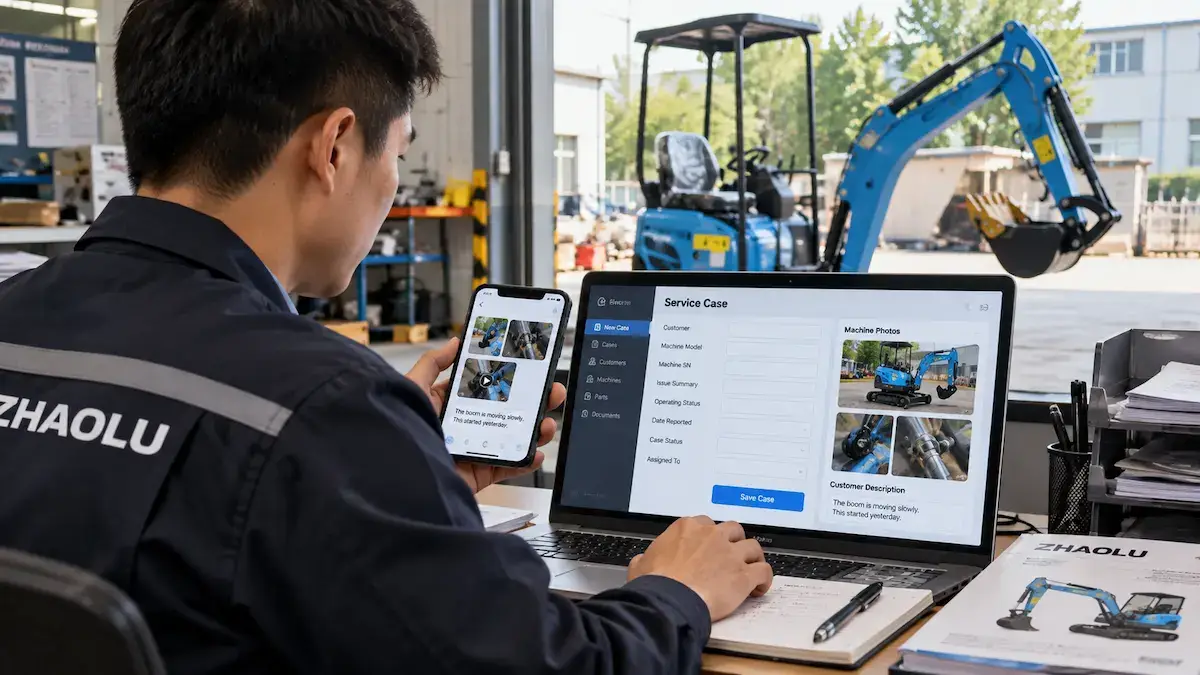
The software is a convenience. The process is what matters. A dealer using a spreadsheet with consistent fields can still manage service cases effectively when the case volume and workflow remain manageable. The key is that records are complete and updated consistently.
Step 2: Confirm the Exact Machine
The case should connect to a specific machine, not just a model family. This is one of the most important pieces of information for technical and parts-related requests.
Useful machine information:
- Model
- Machine identification number
- Engine information where relevant
- Original order or delivery reference
- Customer record
- Configuration record
- Attachment being used when the issue occurred
Two machines of the same model may differ in configuration, depending on the order or production setup. Dealers should not assume that similar machines use identical parts, especially for hydraulic, electrical and engine-related components. The Mini Excavator Warranty Claim Guide explains the documentation required for a clear service or warranty-related request, and the Mini Excavator Repeat Order Guide explains how configuration records help compare machines across batches.
Step 3: Record the Customer’s Description Before Diagnosing
Dealers should record what the customer said before trying to interpret the cause. The customer description is a symptom report, not a diagnosis.
Useful clarification questions:
- Which function is affected?
- When does it happen?
- Is it continuous or intermittent?
- Does the machine still operate?
- Are there any warning indicators?
- Is there visible damage or leakage?
- Is there abnormal sound?
- What attachment was being used?
- What was the machine doing when the issue appeared?
Dealers should keep three things separate:
- Customer symptom — What the customer reports.
- Dealer observation — What the dealer observed directly or through photos and video.
- Confirmed diagnosis — What qualified service personnel or the supplier concludes after review.
These are not automatically the same thing. Treating a customer description as a confirmed diagnosis can lead to incorrect parts ordering or unnecessary repairs.
Step 4: Screen for Immediate Safety Concerns
Before going further, the dealer should check whether the issue may present a safety risk. Examples that may warrant stopping operation include:
- Unstable machine condition
- Major visible damage
- Significant uncontrolled leakage
- Smoke or burning smell
- Critical control problem
- Unsafe structural condition
These examples do not automatically prove a specific fault. They are indicators that operation may need to stop until the machine is reviewed. If continued operation may create risk, the machine should be stopped and qualified service guidance should be followed. Technical diagnosis and repair should be performed according to the machine documentation and by appropriately qualified personnel.
Step 5: Collect Photos, Video and Supporting Evidence
Evidence collection follows the same principles described in the Mini Excavator Warranty Claim Guide. A useful evidence set typically includes:
- Whole-machine photo
- Machine identification photo
- Affected area in context
- Component close-up
- Short video of the symptom, only when safe to record
- Dashboard or warning indication where applicable
- Old-part photo if already removed safely
- Existing service history where relevant
The detailed evidence checklist is covered in the Warranty Claim Guide. This workflow article only needs to confirm that evidence is collected as part of the case, not repeated in a separate channel.
Step 6: Review Existing Machine and Service Records
Before escalating the case, the dealer should check whether the machine already has relevant history. This prevents treating every case as if the machine has no previous record.
Useful records to review:
- Previous service cases
- Parts previously replaced
- Configuration record
- Engine information
- Attachment record
- Previous technical advice
- Repeat-order batch information
The purpose is context, not proof. A previous service record does not automatically explain the current issue, but it helps the dealer and supplier understand the machine’s history. The Mini Excavator Spare Parts Inventory Guide explains how machine records and service history support parts planning and identification.
Step 7: Decide What Type of Support Is Needed
Not every case requires the same escalation. At this stage the dealer should classify the request.
- Information request — Documentation or clarification.
- Parts identification — Confirming the correct part.
- Parts quotation — Requesting pricing and availability.
- Technical support — Needing help interpreting a symptom.
- Warranty-related review — Requesting supplier evaluation under the agreed terms.
- Repair coordination — Arranging the repair itself.
- Documentation request — Manuals, parts diagrams or records.
A case may move between categories. For example, a technical support request may conclude with a parts identification requirement. The classification helps the dealer route the case correctly, not lock it into one path.
Step 8: Escalate to the Supplier with a Complete Case
When supplier involvement is needed, the dealer should send a complete case rather than a short question. Useful information to include:
- Machine identification
- Issue summary
- Photos and video
- Affected function
- Existing service record where relevant
- Checks already completed safely
- Requested support
- Dealer contact information
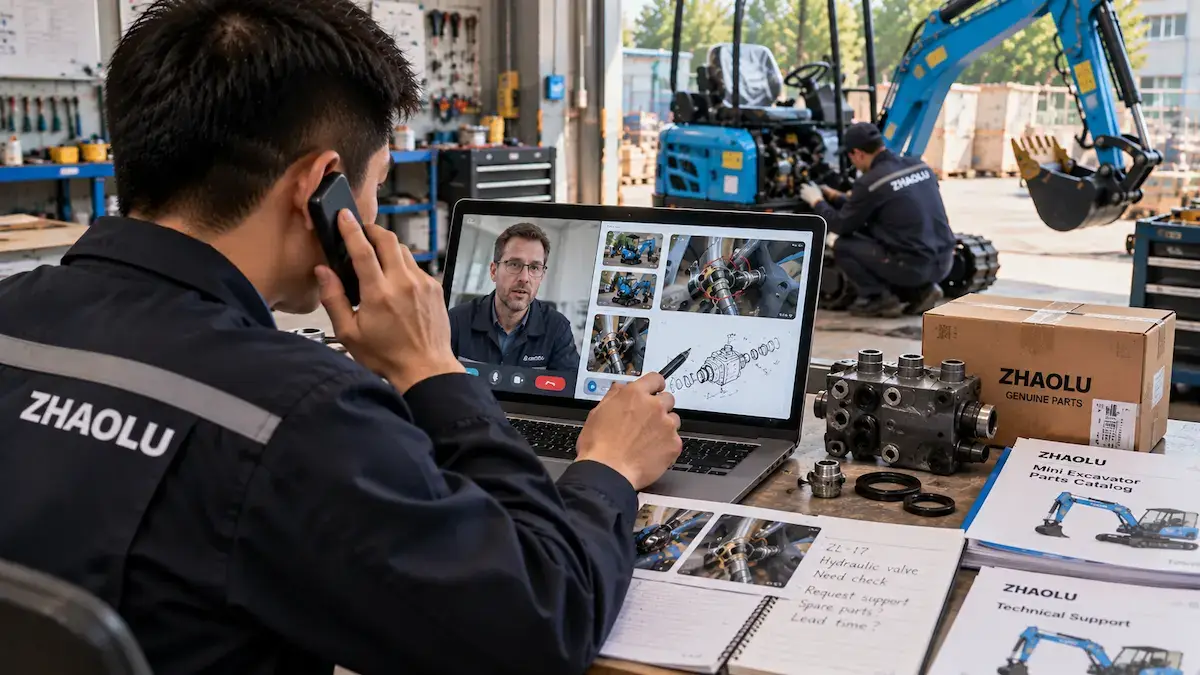
Complete documentation reduces unnecessary clarification. It does not guarantee a specific response time, a specific outcome or warranty approval — those depend on the supplier’s agreed terms and the specific situation. The Mini Excavator Warranty Claim Guide provides the detailed checklist for this step.
Step 9: Coordinate Parts Without Losing the Case History
If parts are required, the parts request should remain connected to the same service case. This keeps the machine, the issue and the resolution in one record.
Information to record:
- Part description
- Part number if confirmed
- Quantity
- Supplier confirmation
- Shipping reference where available
- Date received
- Machine on which the part was installed
Dealers should not assume that parts are free, that shipping is free, or that part compatibility carries over from a similar machine. The Mini Excavator Spare Parts Guide explains parts identification requirements, and the Mini Excavator Spare Parts Inventory Guide explains how parts records support future stock decisions.
Step 10: Keep the Customer Updated Without Overpromising
Customer communication should reflect confirmed status only. Useful updates include:
- Issue recorded
- Technical information collected
- Supplier review requested
- Part identification in progress
- Part ordered, once actually confirmed
- Repair arranged, once actually confirmed
- Case awaiting verification
- Repair completed
The dealer should avoid promising:
- Claim approval
- Free replacement
- Free repair
- Specific completion date
- Specific parts arrival date
- Warranty coverage
Only communicate a status as confirmed when it is actually confirmed. This discipline protects the dealer’s relationship with the customer while the case is still under review.
Step 11: Record the Repair or Resolution
Once the case has moved to resolution, the dealer should record what was actually done.
- Confirmed diagnosis where available
- Action taken
- Part installed
- Repair performed
- Technician notes
- Photos after repair where useful
- Machine status after work
- Customer feedback
- Completion date
The dealer should record what occurred, not what the repair should have contained. If a part was not replaced or a repair was not performed, that is also part of the record.
Step 12: Close the Case Properly
“Customer stopped messaging” is not a good closure rule. A case should be closed when the resolution has been recorded and the relevant records have been updated.
Suggested closure checks:
- Issue outcome recorded
- Parts record updated
- Repair record updated
- Customer informed of the outcome
- Supplier communication saved
- Machine status recorded
- Follow-up action identified if needed
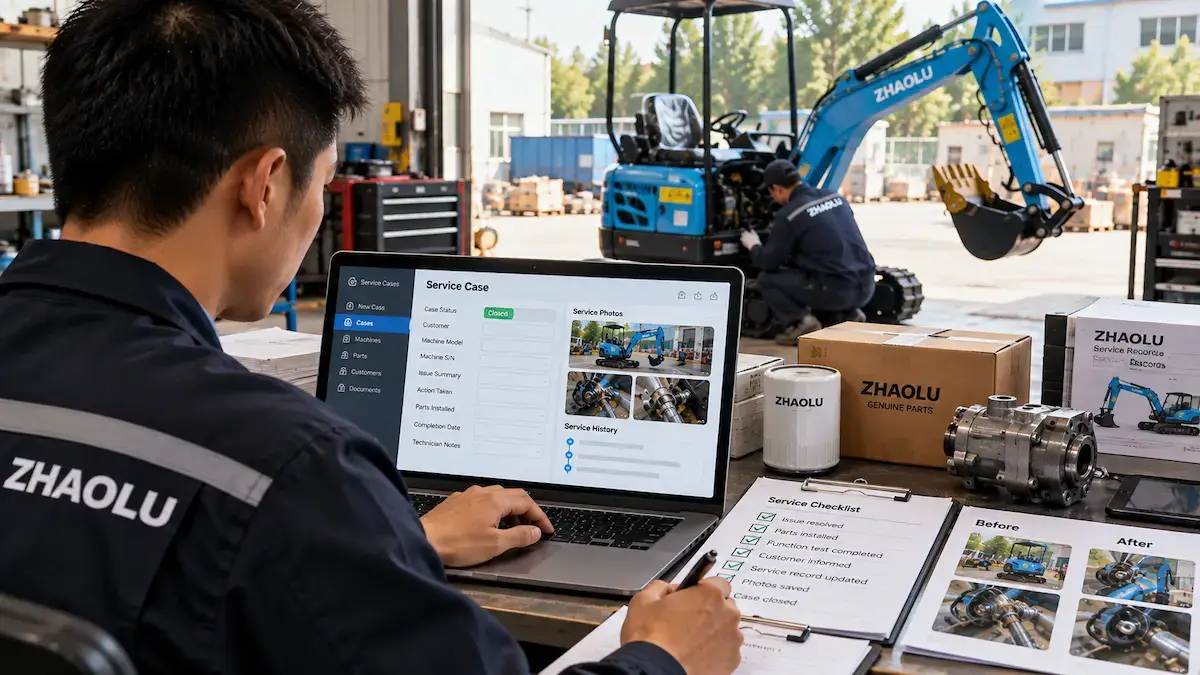
Not every case requires the same closure requirements. A simple parts request may close once the part has been supplied. A technical case may require the dealer to confirm that the machine has returned to operation.
Build a Simple Dealer After-Sales Case Status System
A consistent status system helps the dealer see where every case stands. Status names can be adapted to the dealer’s own system.
| Status | Meaning | Typical Next Action |
|---|---|---|
| New | Issue just reported | Create case record |
| Information Needed | Missing machine or fault details | Collect identification and evidence |
| Under Review | Dealer reviewing case internally | Check service history, classify request |
| Waiting for Supplier | Case submitted to supplier | Await supplier response |
| Waiting for Customer | Additional customer input required | Request clarification |
| Parts Identification | Part to be confirmed | Confirm part number and quantity |
| Parts in Process | Parts ordered or in transit | Track supplier and shipping |
| Repair / Service in Progress | Work underway | Record action taken |
| Verification | Confirming resolution | Check machine function |
| Resolved | Issue addressed | Record outcome |
| Closed | Case complete and recorded | Retain in service history |
The purpose of status names is clarity, not compliance. A dealer can use fewer or more statuses depending on case volume and internal workflow.
Create Clear Ownership for Each Service Case
Each case should have one responsible person or team. Without ownership, cases can stall between departments.
Responsibilities may include:
- Collecting information
- Updating the customer
- Communicating with the supplier
- Tracking parts
- Updating records
- Closing the case
A dealer does not need a dedicated full-time service manager. Small dealers may assign responsibility to an existing employee. The important point is that each case has a clear owner rather than being handled by whoever happens to reply.
Use Service Records to Improve Parts Planning
Closed cases may reveal patterns over time — but only if the records are consistent. Areas that service records may inform:
- Frequently requested parts
- Parts identification needs
- Stock decisions
- Attachment-related demand
- Training needs
- Documentation gaps
Service records may reveal patterns if they exist. They should not be used to make claims about failure rates, component lifespan or service intervals unless the specific data supports those claims. The Mini Excavator Spare Parts Inventory Guide explains how service history supports parts inventory decisions.
Use After-Sales Records When Planning Repeat Orders
Service history may be relevant when the dealer plans a repeat order. Useful considerations:
- Whether the configuration should remain unchanged
- Whether certain parts should be prepared
- Which models create more service complexity
- Whether documentation needs improvement
- Whether dealer service capacity needs adjustment
Service records should not be used to claim that specific models have more problems. The relevant point is whether the dealer’s own service data supports a change in product mix or parts planning. The Mini Excavator Repeat Order Guide explains how service records and configuration records interact with repeat purchasing.
Common Dealer After-Sales Workflow Mistakes
- Keeping service cases only in chat messages
- Failing to identify the exact machine
- Mixing multiple machines in one case
- Starting diagnosis before recording the symptom
- Losing photos and videos
- Separating parts orders from the original service case
- Promising warranty coverage too early
- Giving customers unconfirmed completion dates
- Failing to record the final repair
- Closing cases without updating machine history
These mistakes are usually avoidable with a consistent case record and a clear workflow.
Mini Excavator After-Sales Workflow Checklist
Every status starts at “To Confirm” — the purpose is to make sure important steps are completed before the case moves forward.
| Stage | What to Confirm | Status |
|---|---|---|
| Customer issue received | Case record created | To Confirm |
| Service case created | Case reference and owner assigned | To Confirm |
| Machine identified | Model and identification recorded | To Confirm |
| Issue recorded | Customer symptom described | To Confirm |
| Safety concern reviewed | Stop operation if needed | To Confirm |
| Photos collected | Whole machine, affected area, close-up | To Confirm |
| Video collected if relevant | Recorded safely if useful | To Confirm |
| Service history reviewed | Prior cases and parts checked | To Confirm |
| Support type identified | Information, parts, technical, warranty | To Confirm |
| Supplier contacted if needed | Complete case submitted | To Confirm |
| Part identified if needed | Part number and quantity confirmed | To Confirm |
| Customer updated | Confirmed status only | To Confirm |
| Repair / action recorded | What was done documented | To Confirm |
| Outcome verified | Machine function confirmed | To Confirm |
| Machine record updated | Service history updated | To Confirm |
| Case closed | Outcome recorded and retained | To Confirm |
Dealer After-Sales Workflow Example
The following is a workflow example only. It does not describe a specific ZHAOLU customer case and does not assume a specific diagnosis.
- Customer reports slow boom movement.
- Dealer creates a service case and records the customer’s description.
- Dealer identifies the exact machine and configuration.
- Dealer collects a safe short video showing the boom movement, plus whole-machine and affected-area photos.
- Dealer reviews the machine service record and previous parts history.
- Dealer classifies the request as technical support.
- Dealer submits the case to the supplier with machine identification, video, photos and a summary of the symptom.
- Supplier provides technical guidance and identifies the next action.
- Dealer informs the customer of the confirmed status.
- Dealer records the outcome after the action is completed.
- Dealer updates the machine record and closes the case.
The example is included to show the workflow sequence. It does not identify a cause, a replacement part or a warranty outcome.
Questions Dealers Should Define in Their After-Sales Process
- Who receives the first customer report?
- How is a service case created?
- What machine information is required?
- What photos or videos should be collected?
- Who decides whether operation should stop?
- Who communicates with the supplier?
- How are parts requests linked to service cases?
- Who updates the customer?
- How are supplier responses recorded?
- How are repair results documented?
- Who confirms the case is resolved?
- Where is service history stored?
- How are recurring parts requests reviewed?
- How are closed cases used for future inventory planning?
These are internal questions for the dealer. They do not imply that a specific answer applies to every supplier.
How ZHAOLU Fits into Dealer After-Sales Planning
ZHAOLU currently lists mini excavators approximately from 0.5 ton to 2.5 ton. Dealers requesting technical, parts or warranty-related support should provide clear machine identification and issue information so the request can be reviewed accurately.
Useful starting points:
- Review the available models on the Mini Excavator Product Category page.
- Review commercial supplier information on the Mini Excavator Supplier page.
- Reference the machine’s original order details when submitting a service request.
Dealers should apply the same documentation principles described in this article to any supplier, including providing clear machine identification, an accurate fault description and supporting evidence.
Need Help with a Mini Excavator Service or Parts Request?
If you need technical, parts or warranty-related support for a ZHAOLU mini excavator, provide the machine model, machine identification, issue description, supporting photos or video, affected component and your contact information.
Frequently Asked Questions About Mini Excavator After-Sales Workflow
What is a mini excavator after-sales workflow?
A mini excavator after-sales workflow is the sequence a dealer follows when handling a customer issue: receiving the report, creating a case record, identifying the machine, collecting evidence, escalating to the supplier when needed, coordinating parts, updating the customer, recording the outcome and closing the case with a service record.
What information should a dealer collect when a customer reports a problem?
The dealer should collect machine model, machine identification, order reference, customer description of the issue, operating conditions, photos, video if safe to record, affected component and any safe checks already performed. Not every case requires the same evidence — the required information depends on the type of issue.
Should every service issue have a case record?
Yes. A case record keeps the machine, issue, evidence, parts request, supplier response and resolution connected. Without a consistent record, information is easily lost and future service work becomes harder to support.
When should a dealer contact the supplier for technical support?
The dealer should contact the supplier when the issue cannot be resolved using the available documentation and internal capability, or when the case requires supplier confirmation, part identification or a warranty-related evaluation. A complete case with machine identification and evidence supports the review.
How should parts requests be linked to service cases?
Parts requests should reference the same case. The part description, part number, quantity, supplier confirmation and installation record should be recorded against the service case so the machine history remains complete.
How often should dealers update customers during a service case?
There is no fixed interval. A useful approach is to update the customer when a confirmed status changes: case recorded, information collected, supplier review requested, part confirmed, repair arranged or completed. Only communicate statuses that have actually been confirmed.
When should an after-sales case be closed?
A case should be closed when the resolution has been recorded, parts and repair records have been updated, the customer has been informed of the outcome and the machine history has been updated. “Customer stopped messaging” is not a good closure rule.
Why should dealers keep mini excavator service records?
Service records support accurate parts identification, future service work, configuration comparison between batches and internal review of service workflow. They also help the dealer respond consistently when similar issues appear later.